
Vue3 实现转盘抽奖
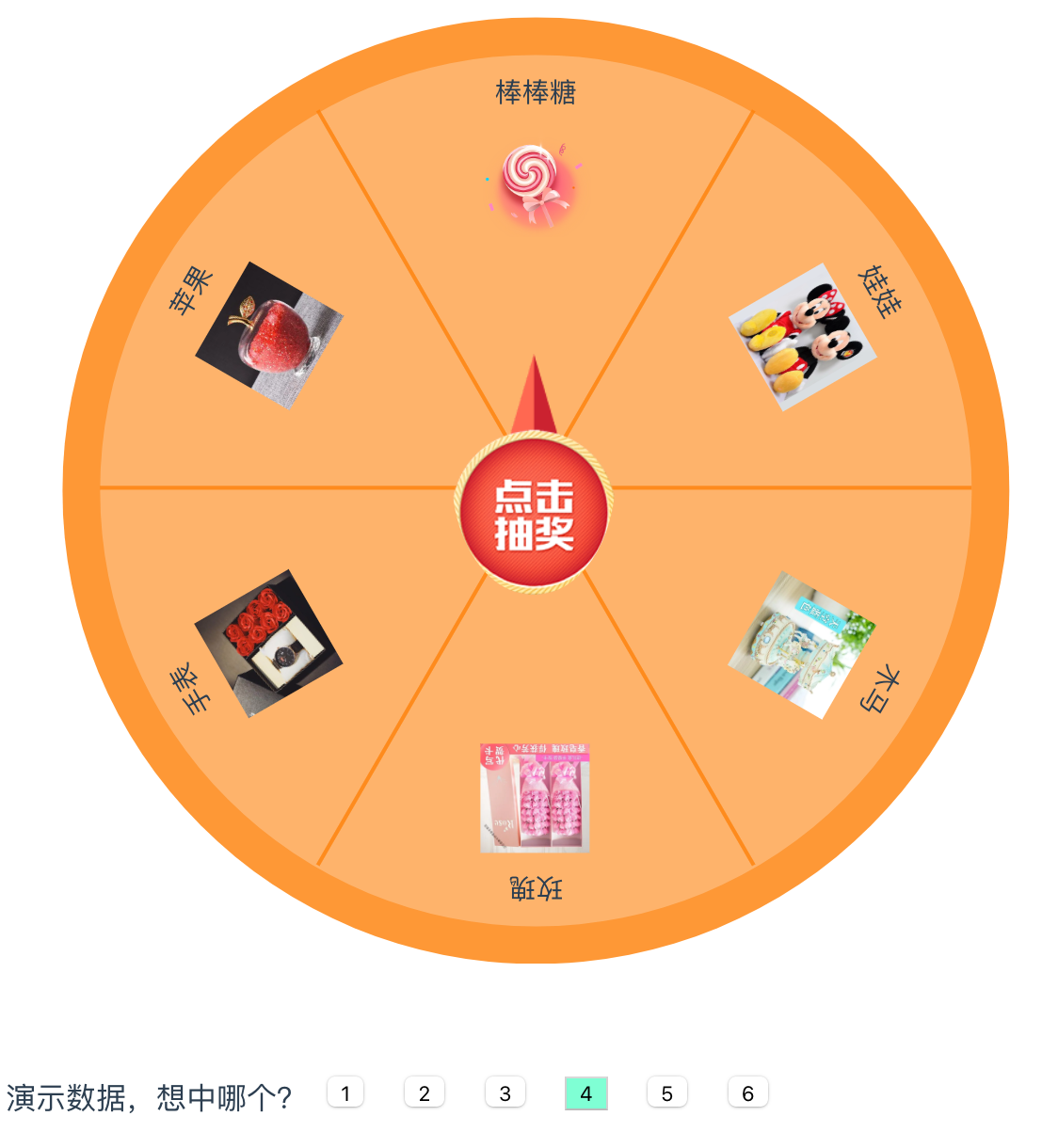
组件封装版:
数据结构:
[{
name: '名称',
pic: '',
id: 0,
}]
使用方式:
<TurntableLottery :listData='listData' :pointerImg='pointerImg' :index="intKey" @onChange="onChange" />

// <TurntableLottery :listData='数据组' :pointerImg='指针图' :boxImg='背景图' :index="命中的id" @onChange="回调结果" />
组件:
<!-- s转盘 抽奖 -->
<template>
	<div class="body">
		<div class="for_box" :style="boxStyle">
			<div class="for_list" :style="styleFor(index)" v-for="(item,index) in listData" :key="index">
				<img class="for_img" :src="item.pic" />
				<div class="for_name">{{item.name}}</div>
			</div>
			<div class="for_lin" :style="styleFor(index)" v-for="(item,index) in listData" :key="index"></div>
		</div>
		<div class="for_tap" :style="`background-image:url(${pointerImg});`" @click="tapGo"> </div>
	</div>

</template>
<script setup>
	import {
		ref,
		defineProps,
		defineEmits
	} from 'vue';

	/* 子组件接收值 */
	const Props = defineProps({
		listData: {
			type: Array, //列表
			value: [{
				name: '名称',
				pic: '',
				id: 0,
			}]
		},
		boxImg: {
			type: String //转盘背景图
		},
		pointerImg: {
			type: String //指针背景图
		},
		index: {
			type: Number //命中列表的id值
		}
	})
	const emits = defineEmits(['onChange']);

	//转盘
	let boxStyle = ref(`background-image:url(${Props.boxImg});`);

	//转盘中间 按钮
	const tapGo = () => {
		let deg = 360 / Props.listData.length; //平均每个度
		let toDeg = 0; //命中坐标
		let index = 0;

		boxStyle.value = `
		transform: rotate(0deg);
		background-image:url(${Props.boxImg});
		`

		//搜索要命中的位置
		for (var i = 0; i < Props.listData.length; i++) {
			index = i;
			if (Props.listData[i].id == Props.index) {
				toDeg = i * deg; //命中位置
				break;
			}
		}
		toDeg = toDeg + 1080

		//定时恢复
		setTimeout(() => {
			console.log(toDeg, Props.index);

			boxStyle.value = `
			transform: rotate(${toDeg}deg);
			transition: transform 5s ease-in-out;
			background-image:url(${Props.boxImg});
			`
		}, 50)

		//给父组件传值
		emits("onChange", {
			index: index,
			data: Props.listData[index],
		});

	}

	/* 循环均分模块  */
	function styleFor(index) {
		let angle = (360 / Props.listData.length) * index; //平均每个度
		return ` transform: rotate(${angle}deg); `;
	}
</script>

<style scoped>
	/* 中间按钮 */
	.for_tap {
		width: 15vw;
		height: 22vw;
		float: left;
		border-radius: 100%;
		background-size: 100% 100%;
		z-index: 3;
		position: absolute;
		left: 41vw;
		top: 31vw;
	}

	.for_tap:active {
		opacity: 0.7;
	}

	.for_lin {
		width: 100%;
		height: 2px;
		float: left;
		background-color: #fd800888;
		position: absolute;
		left: 0vw;
		top: 40vw;
	}

	.for_img {
		width: 10vw;
		height: 10vw;
		float: left;
		margin-top: 5vw;
		background-size: cover;
		position: absolute;
	}

	.for_name {
		width: 100%;
		float: left;
		font-size: 2.5vw;
		position: absolute;
	}

	.for_list {
		width: 100%;
		height: 100%;
		float: left;
		position: absolute;
		padding: 10px;
		box-sizing: border-box;

		display: flex;
		justify-content: center;
	}

	/* 转盘 */
	.for_box {
		width: 80vw;
		height: 80vw;
		float: left;
		border-radius: 50%;
		position: relative;
		background-color: #fd800899;
		background-size: cover;
		border: solid 20px #fd800888;
	}

	.body {
		width: 100%;
		float: left;
		display: flex;
		align-items: center;
		justify-content: center;
		overflow: hidden;
		position: relative;
	}
</style>
原始代码:
<template>
	<div class="body">
		<div class="for_box" :style="boxStyle">
			<div class="for_list" :style="styleFor(index)" v-for="(item,index) in listData" :key="index">
				<img class="for_img" :src="item.pic" />
				<div class="for_name">{{item.name}}</div>
			</div>
			<div class="for_lin" :style="styleFor(index)" v-for="(item,index) in listData" :key="index"></div>
		</div>
		<div class="for_tap" :style="`background-image:url(${pointerImg});`" @click="tapGo"> </div>
	</div>


	<!-- 演示数据 -->
	<div style="float:left;margin-top:50px;z-index:99;">
		<span style="float:left;margin-top:10px;">演示数据,想中哪个?</span>
		<button v-for="(item,index) in listData" :key="index" @click="tapOk(index)"
			:style="index == intKey ? 'background-color:aquamarine;float:left;margin:10px;':'float:left;margin:10px;'">
			{{index+1}}
		</button>
	</div>
</template>
<script setup>
	import {
		ref
	} from 'vue';

	//奖项列表  《《《《《《《
	let listData = ref([{
			name: '玫瑰',
			pic: 'https://img1.baidu.com/it/u=1125656938,422247900&fm=253&fmt=auto&app=120&f=JPEG',
			id: 0,
		},
		{
			name: '手表',
			pic: 'https://img1.baidu.com/it/u=2631716577,1296460670&fm=253&fmt=auto&app=120&f=JPEG',
			id: 1,
		},
		{
			name: '苹果',
			pic: 'https://img2.baidu.com/it/u=2611478896,137965957&fm=253&fmt=auto&app=138&f=JPEG',
			id: 2,
		},
		{
			name: '棒棒糖',
			pic: 'https://img2.baidu.com/it/u=576980037,1655121105&fm=253&fmt=auto&app=138&f=PNG',
			id: 3,
		},
		{
			name: '娃娃',
			pic: 'https://img2.baidu.com/it/u=4075390137,3967712457&fm=253&fmt=auto&app=138&f=PNG',
			id: 4,
		},
		{
			name: '木马',
			pic: 'https://img1.baidu.com/it/u=2434318933,2727681086&fm=253&fmt=auto&app=120&f=JPEG',
			id: 5,
		},

	])

	//转盘背景图
	let boxStyle = ref(``); //转盘背景图 《《《《《《《
	let pointerImg = ref(`http://uii.linwute.com/upload/2023/9/zhizhen.png`); //指针图 《《《《《《《
	let intKey = ref(1); //命中位置 (列表哪个) 《《《《《《《

	//转盘中间 按钮
	const tapGo = () => {
		let deg = 360 / listData.value.length; //平均每个度
		let toDeg = 0; //命中坐标

		//搜索要命中的位置
		for (var i = 0; i < listData.value.length; i++) {
			if (listData.value[i].id == intKey.value) {
				toDeg = 360 - (i * deg); //命中位置
				break;
			}
		}

		boxStyle.value = `
		transform: rotate(${toDeg + 1080}deg);
		transition: transform 5s ease-in-out;
		`
	}

	/* 循环均分模块  */
	function styleFor(index) {
		let angle = (360 / listData.value.length) * index; //平均每个度
		return ` transform: rotate(${angle}deg); `;
	}

	/* 演示按钮 */
	function tapOk(index) {
		intKey.value = index;
		boxStyle.value = `transform: rotate(0deg);`
	}
</script>

<style scoped>
	/* 中间按钮 */
	.for_tap {
		width: 15vw;
		height: 22vw;
		float: left;
		border-radius: 100%;
		background-size: 100% 100%;
		z-index: 3;
		position: absolute;
		left: 41vw;
		top: 31vw;
	}

	.for_tap:active {
		opacity: 0.7;
	}

	.for_lin {
		width: 100%;
		height: 2px;
		float: left;
		background-color: #fd800888;
		position: absolute;
		left: 0vw;
		top: 40vw;
	}

	.for_img {
		width: 10vw;
		height: 10vw;
		float: left;
		margin-top: 5vw;
		background-size: cover;
		position: absolute;
	}

	.for_name {
		width: 100%;
		float: left;
		font-size: 2.5vw;
		position: absolute;
	}

	.for_list {
		width: 100%;
		height: 100%;
		float: left;
		position: absolute;
		padding: 10px;
		box-sizing: border-box;

		display: flex;
		justify-content: center;
	}

	/* 转盘 */

	.for_box {
		width: 80vw;
		height: 80vw;
		float: left;
		border-radius: 50%;
		position: relative;
		background-color: #fd800899;
		background-size: cover;
		border: solid 20px #fd800888;
	}

	.body {
		width: 100%;
		float: left;
		display: flex;
		align-items: center;
		justify-content: center;
		overflow: hidden;
		position: relative;
	}
</style>